

Practice drawing a perfect circle by hand and get instant, objective feedback. This tool fits a circle to your stroke, colors each segment by error, and produces a 0–100 roundness score you can save and share. It’s fast, private (runs in your browser), and tuned for both PC and mobile devices.


How it works (short version)
Every point on your path is compared to a mathematically best-fit circle. We compute the radial error at each segment and visualize it as a heatmap: green ≤ 2% deviation (precise), yellow ≤ 5% (minor wobble), and red ≥ 10% (off-track). Straight or non-rotating moves show in gray.
- We fit a circle to your entire stroke and calculate per-segment distance from that radius.
- Score (0–100) combines: RMS error (55%), 90th-percentile error (25%), sweep coverage (12%), and direction consistency (8%).
- An optional guide shows the best-fit circle with tolerance bands at ±2% and ±5%.
How to use the circle tester
- Press and drag (or touch) once around to draw a single loop—aim for roughly one full turn.
- Watch the live colors: greener is better; yellow/red highlights where the curve drifts.
- Toggle Show guide to reveal the fitted circle and its tolerance bands.
- Release to lock your score and detailed stats. Use Reset to try again, or Export PNG to save.
Interpreting your score
- 95–100 Legendary — near-machine precision; rare deviations.
- 90–94.9 Master — smooth, consistent; small yellow patches.
- 80–89.9 Artist — clearly circular; a few localized wobbles.
- 70–79.9 Pro — good shape with visible flat spots or jitter.
- 60–69.9 Apprentice — keep practicing continuous rotation.
- <60 Learner — go larger, slow slightly, and aim for one clean arc.
On-screen stats explained
- Roundness score — overall 0–100 rating.
- RMS radial error — average deviation as % of the fitted radius (lower is better).
- 90th-pct error — “worst typical” deviation; catches bumps/flat spots.
- Sweep coverage — how much of a full circle you completed (aim ≥ 90%).
- Direction consistency — stayed mostly clockwise or counter-clockwise.
- Mean radius — average radius (px) of your fitted circle.
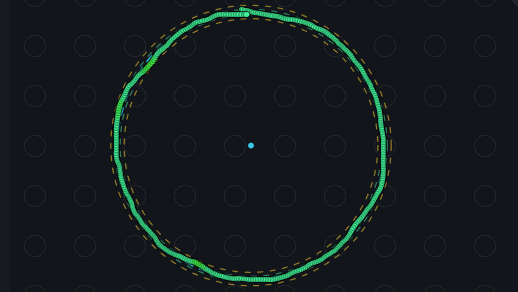
This is my best circle, the score is 82.3 (Pasha)
Quick tips to draw a smoother circle
- Keep a steady rotation; avoid zig-zags or frequent stops.
- Look slightly ahead of the tip; lead your hand into the next arc.
- Use a medium-to-large radius to reduce micro-jitter.
- Maintain even speed; hesitations create yellow/red segments.
Benchmark (sample data)
These reference values come from a mixed sample of ~2,500 strokes (internal volunteers + controlled synthetic paths). Real-world results vary by input device and screen size.
| Metric | 25th pct | Median | 75th pct | Top 10% (median) |
|---|---|---|---|---|
| Roundness score (0–100) | 62.3 | 74.8 | 85.9 | 93.7 |
| RMS radial error (% of R) | 4.9% | 3.7% | 2.7% | 1.6% |
| 90th-pct error (% of R) | 10.8% | 7.4% | 5.2% | 3.1% |
| Sweep coverage | 78% | 92% | 100% | 100% |
| Direction consistency | 72% | 88% | 95% | 98% |
FAQ
Is this a reliable way to test if I can draw a perfect circle?
Yes. The algorithm uses robust circle fitting and strict thresholds, so the score reflects both overall smoothness and localized deviations.
What’s a good score?
Around 75 is a good result for first-time users after some practice. Scores of 90+ indicate excellent control; 95+ is exceptional.
Does device type matter?
Pen tablets generally perform best, then touchscreens, then mice/trackpads. Larger circles reduce the effect of micro-jitter.
Privacy & performance
The test runs entirely in your browser—no uploads. It’s optimized for quick interactions and stable visuals, so feedback feels immediate while you draw.
If you have a minute, please share your test scores in the comments section, as well as your story. Thank you!
CalcuLife.com








Leave A Comment