

This online calculator computes the surface area of a sphere from any one of: radius r, diameter d, or great-circle circumference c. Displays all related values (A, r, d, c) consistently.
Sphere Surface Area Calculator
Enter only one parameter: radius r, diameter d or great-circle circumference c. The tool computes area A and shows r, d, c on the diagram.
Sphere visualization
Radius (r)
or
Diameter (d)
or
Circumference (c)
Surface Area (A)
Calculation details will appear here.
Decimal Places


How to use
- Enter one value: radius r, or diameter d, or circumference c. (If you enter several, the calculator uses r → d → c priority and warns on inconsistency.)
- Click Calculate. The tool outputs surface area A and shows r, d, c on the visualization.
- Adjust Decimal Places (0–8) to control rounding; the internal computation uses full precision.
- Use Copy Result to copy A for reports or further work.
Formulas and relations
- A = 4·π·r²
- d = 2·r
- c = 2·π·r
Equivalently, from other inputs:
- From d: A = π·d²
- From c: A = c²/π
- Conversions: r = d/2 = c/(2·π)
Sources: Wolfram MathWorld — Sphere, NIST DLMF §4.3.
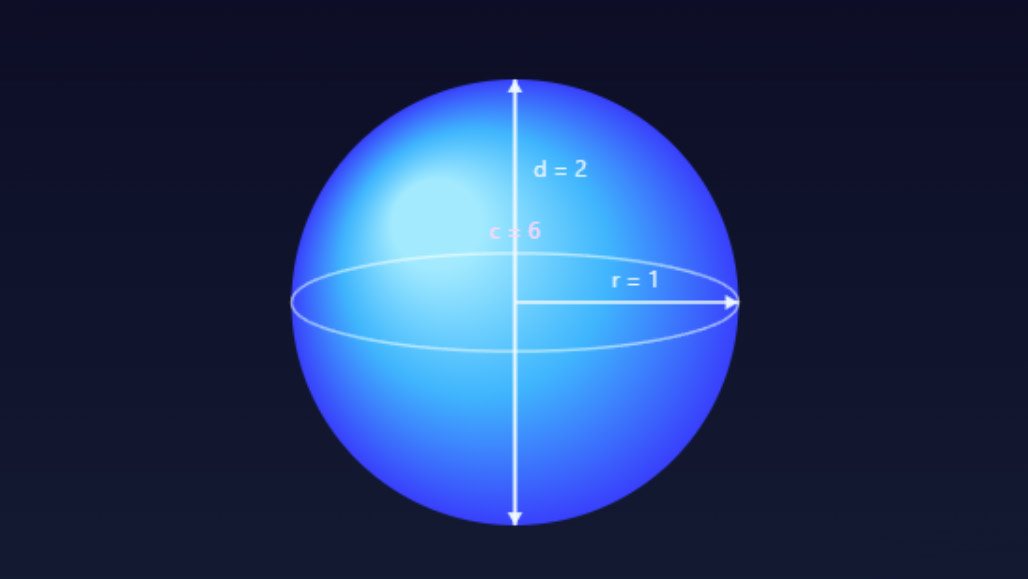
Vizualisation of a sphere with parameters
Inputs and units
All linear inputs (r, d, c) use the same unit (mm, cm, m, in, ft, etc.). The area result A is reported in the corresponding squared unit (mm², cm², m², in², ft², etc.).
Example calculations
- Given r = 4 cm → A = 4·π·4² = 64·π ≈ 201.0619 cm²; d = 8 cm; c = 2·π·4 ≈ 25.1327 cm.
- Given d = 1.2 m → A = π·(1.2)² ≈ 4.5239 m²; r = 0.6 m; c = 2·π·0.6 ≈ 3.7699 m.
- Given c = 10 in → r = c/(2·π) ≈ 1.5915 in; d ≈ 3.1831 in; A = c²/π ≈ 31.83099 in².
Accuracy and rounding
- π is taken from the runtime environment with double precision.
- Displayed values are rounded to the chosen decimal places; intermediate steps use full precision to reduce rounding error.
- If you supply multiple inputs that disagree beyond numeric tolerance, the calculator flags the mismatch and proceeds using the highest-priority field.
When to use this calculator
- Geometry homeworks and exams (quick checks of sphere relations).
- Engineering and fabrication (coatings, surface treatments, material estimates).
- 3D graphics, simulation, and game asset specs (area-dependent effects).
- Science labs (surface-related phenomena such as heat transfer or diffusion models).
CalcuLife.com




Leave A Comment