

This online calculator computes the volume of a truncated pyramid (frustum) for both square and rectangular bases. It implements the standard frustum volume formula with consistent unit handling and precision control. The method is based on classical geometry (see Frustum – Volume), so results are mathematically reliable when inputs are valid (non-negative dimensions with top/base in the same unit).
Square: Abottom=a², Atop=b² ⇒ V = (h/3)(a² + b² + ab)
Rectangular: Abottom=L₁·W₁, Atop=L₂·W₂


How to Use
- Choose Square, Rectangular, or Areas mode.
- Enter:
- Square: bottom side a, top side b, height h.
- Rectangular: bottom L₁ × W₁, top L₂ × W₂, height h.
- Areas: bottom area Abottom, top area Atop, height h.
- Select the unit and decimal precision, then click Calculate.
- The visualization reflects your proportions: blue ≈ length (L), green ≈ width (W), red ≈ height (h). The pill below shows your inputs for copy/paste.
Formulas
General frustum volume
V = (h / 3) · (Abottom + Atop + √(Abottom · Atop))
Square bases (bottom side a, top side b):
Abottom = a², Atop = b² ⇒ V = (h / 3) · (a² + b² + a·b)
Rectangular bases (bottom L₁×W₁, top L₂×W₂):
Abottom = L₁·W₁, Atop = L₂·W₂ ⇒ V = (h / 3) · (L₁W₁ + L₂W₂ + √(L₁W₁·L₂W₂))
Sanity checks. If top equals bottom (Atop = Abottom), the shape becomes a prism and V = Abottom·h. If top is 0, it’s a full pyramid and V = (Abottom·h)/3.
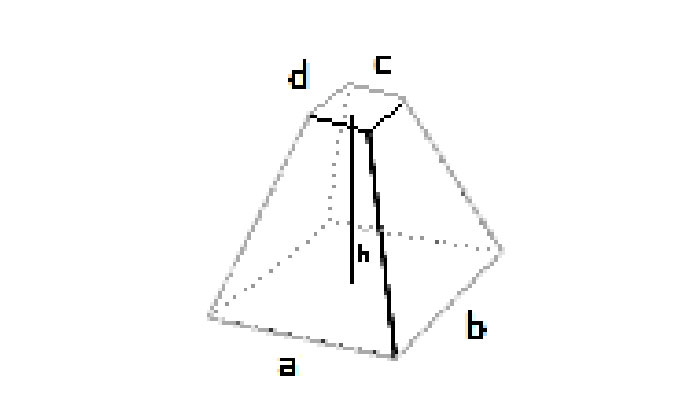
Pre-calculated Examples (all inputs in cm; volumes in cm³)
| Mode | Bottom dimensions | Top dimensions | h | Volume |
|---|---|---|---|---|
| Square | a × a = 10 × 10 | b × b = 6 × 6 | 12 | 784 |
| Square | a × a = 5 × 5 | b × b = 5 × 5 | 8 | 200 |
| Square | a × a = 20 × 20 | b × b = 10 × 10 | 15 | 3,500 |
| Square | a × a = 7.5 × 7.5 | b × b = 3.2 × 3.2 | 18 | 542.94 |
| Rectangular | L₁×W₁ = 12 × 8 | L₂×W₂ = 6 × 4 | 20 | 1,120 |
| Rectangular | L₁×W₁ = 50 × 40 | L₂×W₂ = 30 × 20 | 35 | 43,113.5263 |
| Rectangular | L₁×W₁ = 15 × 10 | L₂×W₂ = 15 × 5 | 12 | 1,324.2641 |
All values double-checked with V = (h/3)(Abottom + Atop + √(AbottomAtop)). Rounding shown to 2–4 decimals where helpful.
Practical Tips & Quality Checks
- Keep units consistent. Enter all linear dimensions in the same unit; the calculator converts to volume in that unit³ (e.g., cm → cm³).
- Measure height correctly. Use the perpendicular distance between bases (not a slant edge).
- Use Areas mode when you already know base areas (from drawings, CAD, or site measurements) to avoid compounding rounding error.
- Sanity check with extremes: If b → a, result should approach A·h. If b → 0, result should approach (A·h)/3.
- Precision control: Increase “Decimals” when inputs are small or when you plan to chain calculations (e.g., to mass using density).
CalcuLife.com






Leave A Comment