

Our gradient generator is built for real work and getting best results easily. You can create linear, radial, and conic gradients, control each color stop, copy production-ready CSS, and download the gradient as a high-resolution PNG.


What This Gradient Generator Does
The tool creates random CSS gradients with live visual editing. You can choose the gradient type, set the number of colors, edit each HEX value, move color stop positions, randomize the result, reverse colors, copy CSS, and export the gradient as an image.
I designed it around the tasks people actually need: making website backgrounds, hero sections, cards, buttons, app screens, social graphics, thumbnails, and quick design assets without opening a full design program.
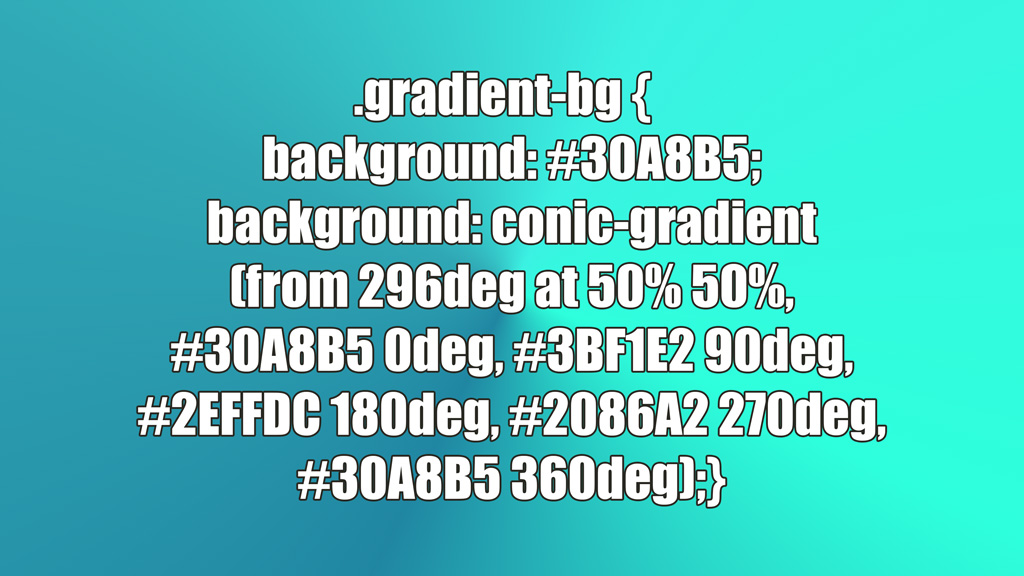
One example of a gradient generated with this tool, and its css code on the top
Gradient Types
| Type | How It Works | Real Use |
|---|---|---|
| Linear | Colors move across a straight direction, controlled by angle. | Hero backgrounds, buttons, banners, cards, section backgrounds. |
| Radial | Colors expand from a center point outward. | Glow effects, spotlight backgrounds, app cards, abstract blocks. |
| Conic | Colors rotate around a center point. | Color wheels, badges, circular graphics, decorative backgrounds. |
Color Stops
A gradient is controlled by color stops. Each stop has a color and a position. For example, a simple two-color gradient may start with #4F6DF7 at 0% and end with #9B6DFF at 100%.
This tool supports up to 10 colors. That is useful when you need a smooth multi-color background, a conic color wheel, or a complex abstract gradient. For normal website UI, 2 or 3 colors are usually enough.
| Colors | Best Use |
|---|---|
| 2 colors | Clean buttons, headers, cards, simple backgrounds. |
| 3 colors | Modern hero sections, soft transitions, brand-style backgrounds. |
| 4-5 colors | More expressive backgrounds, posters, thumbnails, conic gradients. |
| 6-10 colors | Color wheels, abstract art, complex decorative gradients. |
Angle and Center Controls
Linear gradients use an angle. A 90deg gradient moves left to right. A 180deg gradient moves top to bottom. Diagonal values like 135deg are common for modern web backgrounds.
Radial and conic gradients use a center point. You can set the X and Y position manually or click the preview area. This is useful when the glow, focus point, or circular rotation should come from a specific part of the design.
Random Gradients
The random generator is useful when you want quick ideas without manually picking every color. The default mode is full random. You can also choose more controlled styles:
- Balanced: general-purpose gradients with usable saturation and brightness.
- Soft: light gradients for calm backgrounds and subtle UI.
- Vivid: high-energy gradients for banners, thumbnails, and attention blocks.
- Dark: deeper gradients for headers, overlays, and dark UI.
- Warm: red, orange, yellow, and pink directions.
- Cool: blue, cyan, green, and violet directions.
Presets
The preset buttons are fast starting points. Use them when you want a known direction instead of random colors. For example, Sunset works well for warm promotional sections, Ocean for clean tech or travel visuals, Midnight for dark hero sections, and Steel for neutral professional UI.
Copyable CSS
The tool gives you ready-to-use CSS with a fallback color and the full gradient declaration:
.gradient-bg {
  background: #4F6DF7;
  background: linear-gradient(135deg, #4F6DF7 0%, #9B6DFF 100%);
}
You can also copy only the background declaration or copy CSS variables. Variables are useful when you want to reuse the same gradient across buttons, cards, headers, or theme files.
CSS Variables Output
The CSS variables include every gradient color and stop position. This makes the gradient easier to maintain later:
:root {
  --gradient-color-1: #4F6DF7;
  --gradient-stop-1: 0%;
  --gradient-color-2: #9B6DFF;
  --gradient-stop-2: 100%;
  --gradient-angle: 135deg;
  --gradient-background: linear-gradient(135deg, #4F6DF7 0%, #9B6DFF 100%);
}
PNG Download
The PNG export is for cases where you just need a quick picture of a gradient to put an inscription ot or get a wallpaper. You can download the gradient as a high-resolution image in three formats:
| Format | Use |
|---|---|
| Vertical | Phone wallpapers, mobile stories, vertical posts. |
| Square | Social posts, thumbnails, icons, design assets, memes. |
| 16:9 | Website hero images, YouTube thumbnails, slides, desktop backgrounds. |
Contrast Check
The tool samples the gradient and checks whether black or white text is more readable on it. This is practical for headings, hero sections, buttons, and cards. Gradient contrast is not one fixed number because the background changes across the area, so the tool reports the worst sampled contrast.
Practical Tips
- Use 2 colors for clean UI gradients.
- Use 3 colors for modern hero sections.
- Use 5 colors for conic gradients so the circle closes cleanly.
- Keep strong gradients behind large text, not small paragraphs.
- Use dark gradients with white text and light gradients with black text.
- Use PNG export for graphics, CSS output for websites.
CalcuLife.com






Leave A Comment